If your graph contains subgraphs, you only need to provide the checkpointer when compiling the parent graph. LangGraph will automatically propagate the checkpointer to the child subgraphs.
import { StateGraph, START, MemorySaver } from "@langchain/langgraph";import * as z from "zod";const State = z.object({ foo: z.string() });const subgraphBuilder = new StateGraph(State) .addNode("subgraph_node_1", (state) => { return { foo: state.foo + "bar" }; }) .addEdge(START, "subgraph_node_1");const subgraph = subgraphBuilder.compile();const builder = new StateGraph(State) .addNode("node_1", subgraph) .addEdge(START, "node_1");const checkpointer = new MemorySaver();const graph = builder.compile({ checkpointer });
If you want the subgraph to have its own memory, you can compile it with the appropriate checkpointer option. This is useful in multi-agent systems, if you want agents to keep track of their internal message histories.
Use long-term memory to store user-specific or application-specific data across conversations.
import { InMemoryStore, StateGraph } from "@langchain/langgraph";const store = new InMemoryStore();const builder = new StateGraph(...);const graph = builder.compile({ store });
Most LLMs have a maximum supported context window (denominated in tokens). One way to decide when to truncate messages is to count the tokens in the message history and truncate whenever it approaches that limit. If you’re using LangChain, you can use the trim messages utility and specify the number of tokens to keep from the list, as well as the strategy (e.g., keep the last maxTokens) to use for handling the boundary.To trim message history, use the trimMessages function:
You can delete messages from the graph state to manage the message history. This is useful when you want to remove specific messages or clear the entire message history.To delete messages from the graph state, you can use the RemoveMessage. For RemoveMessage to work, you need to use a state key with messagesStateReducerreducer, like MessagesZodState.To remove specific messages:
import { RemoveMessage } from "@langchain/core/messages";const deleteMessages = (state) => { const messages = state.messages; if (messages.length > 2) { // remove the earliest two messages return { messages: messages .slice(0, 2) .map((m) => new RemoveMessage({ id: m.id })), }; }};
When deleting messages, make sure that the resulting message history is valid. Check the limitations of the LLM provider you’re using. For example:
Some providers expect message history to start with a user message
Most providers require assistant messages with tool calls to be followed by corresponding tool result messages.
Full example: delete messages
import { RemoveMessage, BaseMessage } from "@langchain/core/messages";import { ChatAnthropic } from "@langchain/anthropic";import { StateGraph, START, MemorySaver, MessagesZodMeta } from "@langchain/langgraph";import * as z from "zod";import { registry } from "@langchain/langgraph/zod";const MessagesZodState = z.object({ messages: z .array(z.custom<BaseMessage>()) .register(registry, MessagesZodMeta),});const model = new ChatAnthropic({ model: "claude-3-5-sonnet-20241022" });const deleteMessages = (state: z.infer<typeof MessagesZodState>) => { const messages = state.messages; if (messages.length > 2) { // remove the earliest two messages return { messages: messages.slice(0, 2).map(m => new RemoveMessage({ id: m.id })) }; } return {};};const callModel = async (state: z.infer<typeof MessagesZodState>) => { const response = await model.invoke(state.messages); return { messages: [response] };};const builder = new StateGraph(MessagesZodState) .addNode("call_model", callModel) .addNode("delete_messages", deleteMessages) .addEdge(START, "call_model") .addEdge("call_model", "delete_messages");const checkpointer = new MemorySaver();const app = builder.compile({ checkpointer });const config = { configurable: { thread_id: "1" } };for await (const event of await app.stream( { messages: [{ role: "user", content: "hi! I'm bob" }] }, { ...config, streamMode: "values" })) { console.log(event.messages.map(message => [message.getType(), message.content]));}for await (const event of await app.stream( { messages: [{ role: "user", content: "what's my name?" }] }, { ...config, streamMode: "values" })) { console.log(event.messages.map(message => [message.getType(), message.content]));}
[['human', "hi! I'm bob"]][['human', "hi! I'm bob"], ['ai', 'Hi Bob! How are you doing today? Is there anything I can help you with?']][['human', "hi! I'm bob"], ['ai', 'Hi Bob! How are you doing today? Is there anything I can help you with?'], ['human', "what's my name?"]][['human', "hi! I'm bob"], ['ai', 'Hi Bob! How are you doing today? Is there anything I can help you with?'], ['human', "what's my name?"], ['ai', 'Your name is Bob.']][['human', "what's my name?"], ['ai', 'Your name is Bob.']]
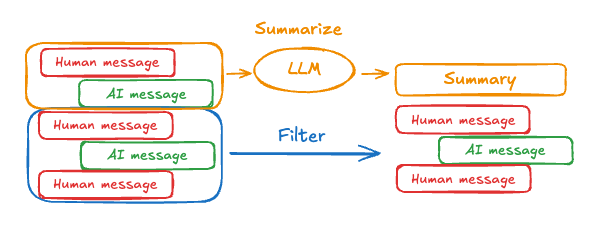
The problem with trimming or removing messages, as shown above, is that you may lose information from culling of the message queue. Because of this, some applications benefit from a more sophisticated approach of summarizing the message history using a chat model.Prompting and orchestration logic can be used to summarize the message history. For example, in LangGraph you can include a summary key in the state alongside the messages key:
import { BaseMessage } from "@langchain/core/messages";import { MessagesZodMeta } from "@langchain/langgraph";import { registry } from "@langchain/langgraph/zod";import * as z from "zod";const State = z.object({ messages: z .array(z.custom<BaseMessage>()) .register(registry, MessagesZodMeta), summary: z.string().optional(),});
Then, you can generate a summary of the chat history, using any existing summary as context for the next summary. This summarizeConversation node can be called after some number of messages have accumulated in the messages state key.
import { RemoveMessage, HumanMessage } from "@langchain/core/messages";const summarizeConversation = async (state: z.infer<typeof State>) => { // First, we get any existing summary const summary = state.summary || ""; // Create our summarization prompt let summaryMessage: string; if (summary) { // A summary already exists summaryMessage = `This is a summary of the conversation to date: ${summary}\n\n` + "Extend the summary by taking into account the new messages above:"; } else { summaryMessage = "Create a summary of the conversation above:"; } // Add prompt to our history const messages = [ ...state.messages, new HumanMessage({ content: summaryMessage }) ]; const response = await model.invoke(messages); // Delete all but the 2 most recent messages const deleteMessages = state.messages .slice(0, -2) .map(m => new RemoveMessage({ id: m.id })); return { summary: response.content, messages: deleteMessages };};
Full example: summarize messages
import { ChatAnthropic } from "@langchain/anthropic";import { SystemMessage, HumanMessage, RemoveMessage, type BaseMessage} from "@langchain/core/messages";import { MessagesZodMeta, StateGraph, START, END, MemorySaver,} from "@langchain/langgraph";import { BaseMessage } from "@langchain/core/messages";import { registry } from "@langchain/langgraph/zod";import * as z from "zod";import { v4 as uuidv4 } from "uuid";const memory = new MemorySaver();// We will add a `summary` attribute (in addition to `messages` key,// which MessagesZodState already has)const GraphState = z.object({ messages: z .array(z.custom<BaseMessage>()) .register(registry, MessagesZodMeta), summary: z.string().default(""),});// We will use this model for both the conversation and the summarizationconst model = new ChatAnthropic({ model: "claude-haiku-4-5-20251001" });// Define the logic to call the modelconst callModel = async (state: z.infer<typeof GraphState>) => { // If a summary exists, we add this in as a system message const { summary } = state; let { messages } = state; if (summary) { const systemMessage = new SystemMessage({ id: uuidv4(), content: `Summary of conversation earlier: ${summary}`, }); messages = [systemMessage, ...messages]; } const response = await model.invoke(messages); // We return an object, because this will get added to the existing state return { messages: [response] };};// We now define the logic for determining whether to end or summarize the conversationconst shouldContinue = (state: z.infer<typeof GraphState>) => { const messages = state.messages; // If there are more than six messages, then we summarize the conversation if (messages.length > 6) { return "summarize_conversation"; } // Otherwise we can just end return END;};const summarizeConversation = async (state: z.infer<typeof GraphState>) => { // First, we summarize the conversation const { summary, messages } = state; let summaryMessage: string; if (summary) { // If a summary already exists, we use a different system prompt // to summarize it than if one didn't summaryMessage = `This is summary of the conversation to date: ${summary}\n\n` + "Extend the summary by taking into account the new messages above:"; } else { summaryMessage = "Create a summary of the conversation above:"; } const allMessages = [ ...messages, new HumanMessage({ id: uuidv4(), content: summaryMessage }), ]; const response = await model.invoke(allMessages); // We now need to delete messages that we no longer want to show up // I will delete all but the last two messages, but you can change this const deleteMessages = messages .slice(0, -2) .map((m) => new RemoveMessage({ id: m.id! })); if (typeof response.content !== "string") { throw new Error("Expected a string response from the model"); } return { summary: response.content, messages: deleteMessages };};// Define a new graphconst workflow = new StateGraph(GraphState) // Define the conversation node and the summarize node .addNode("conversation", callModel) .addNode("summarize_conversation", summarizeConversation) // Set the entrypoint as conversation .addEdge(START, "conversation") // We now add a conditional edge .addConditionalEdges( // First, we define the start node. We use `conversation`. // This means these are the edges taken after the `conversation` node is called. "conversation", // Next, we pass in the function that will determine which node is called next. shouldContinue, ) // We now add a normal edge from `summarize_conversation` to END. // This means that after `summarize_conversation` is called, we end. .addEdge("summarize_conversation", END);// Finally, we compile it!const app = workflow.compile({ checkpointer: memory });
const config = { configurable: { thread_id: "1", // optionally provide an ID for a specific checkpoint, // otherwise the latest checkpoint is shown // checkpoint_id: "1f029ca3-1f5b-6704-8004-820c16b69a5a" },};await graph.getState(config);
If you are using any database-backed persistence implementation (such as Postgres or Redis) to store short and/or long-term memory, you will need to run migrations to set up the required schema before you can use it with your database.By convention, most database-specific libraries define a setup() method on the checkpointer or store instance that runs the required migrations. However, you should check with your specific implementation of BaseCheckpointSaver or BaseStore to confirm the exact method name and usage.We recommend running migrations as a dedicated deployment step, or you can ensure they’re run as part of server startup.